Build Your Backrooms Buildings Index
Catalog of every placeable structure—pathing roles, monster pairings, and unlock priorities for maze builders.
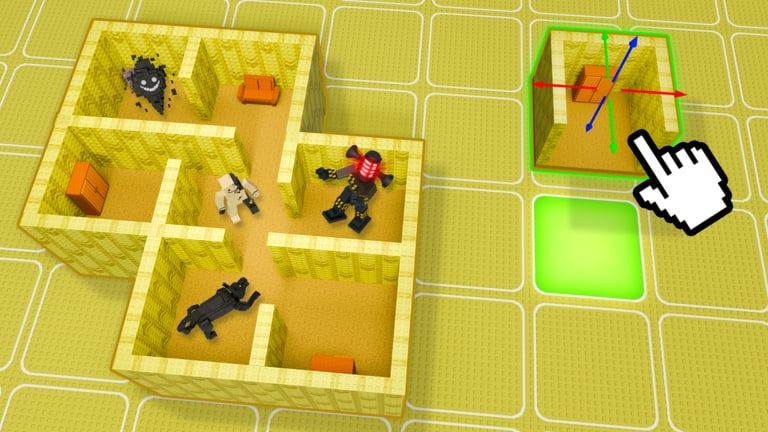
The Buildings Index lists every major placeable structure family in Build Your Backrooms on Roblox. Wind Sun Moon [WSM] describes the game as building an incredible backrooms maze, then filling it with monsters that catch visitors for cash. Buildings are the half of that sentence players underestimate—geometry earns as much as hunters when routes compress correctly.
Ranked recommendations live on the Buildings Tier List. Monster pairings are cataloged on the Monsters Index. Start from the Catalog Hub if you need the big picture.
What counts as a building
In this wiki, buildings means any unlock you place to form maze geometry:
- Repeatable hallway segments
- Corners, junctions, and connectors
- Dead-end wings and trap alcoves
- Larger feature rooms and transition chambers
- Cosmetic variants that share pathing with functional modules
Decor props that do not affect walkable paths may appear in shop rotations; this index focuses on pieces that change visitor movement.
Core hallway modules
Standard Liminar Hallway
Function: Straight walkable segment, default length one cell.
Pathing effect: Extends route duration with minimal escape options.
Monster synergy: Corridor Stalkers at mid-span; Quick Tag Hunters in repeated chains.
Tier: S — see Buildings Tier List.
Notes: Stack end-to-end until junction budget allows forks.
Narrow Squeeze Segment
Function: Single-file width hallway.
Pathing effect: Prevents sidestepping around hunters.
Monster synergy: Quick Tag Hunters, slow bulwark archetypes.
Tier: A.
Notes: Use sparingly to avoid visitor frustration on main spine routes.
Offset Corner Link
Function: 90-degree turn breaking sightlines.
Pathing effect: Forces speed reset at turns.
Monster synergy: Junction Lurkers placed just past the bend.
Tier: S.
Notes: Essential budget piece before four-way hubs unlock.
Junction and connector pieces
T-Junction Branch
Function: Three-way split with one forward and two lateral options.
Pathing effect: Creates wrong-turn opportunities.
Monster synergy: Junction Lurkers on bait branch; Dead-End Guards at stub ends.
Tier: A.
Four-Way Junction Core
Function: Four outgoing directions from central tile.
Pathing effect: Maximum decision density per building slot.
Monster synergy: Multiple lurkers or one Offline Anchor at hub.
Tier: S.
Loop Connector
Function: Rejoins route without returning to entrance.
Pathing effect: Prevents backtracking skips.
Monster synergy: Any mid-tier hunter on re-entry path.
Tier: A.
Trap and specialty wings
Short Stub Hall
Function: Short dead-end branch.
Pathing effect: Bait wing for optional exploration.
Monster synergy: Dead-End Guard archetypes.
Tier: B alone; A when used as intentional trap.
Utility Closet Niche
Function: Small alcove off main hall.
Pathing effect: Minor detour.
Monster synergy: Noise-triggered hunters.
Tier: B–C depending on maze theme.
Elevated Threshold Room
Function: Transition chamber between hallway chains.
Pathing effect: Speed change and sight reset.
Monster synergy: Zone Patrollers with bounded roam area.
Tier: A.
Large-format rooms
Wide Gallery Span
Function: Open chamber with multiple exit angles.
Pathing effect: Low compression unless inner segments added.
Monster synergy: Zone Patrollers; multiple quick tag slots if pillars constrain paths.
Tier: C for income; useful for showcase mazes.
Open Plaza Chamber
Function: Large liminal space for visual impact.
Pathing effect: Spreads visitors thin.
Monster synergy: Patrollers only with deliberate inner loops.
Tier: C.
Mirror Hall Duplicate
Function: Symmetric disorienting layout.
Pathing effect: Confuses first-time explorers.
Monster synergy: Junction Lurkers at hidden asymmetric breaks.
Tier: B.
Cosmetic and variant entries
Color-variant hallways share pathing with standard modules but cost premium currency or event tokens when available. Buy variants after functional coverage is complete unless an event offers discounted bundles—track Updates Hub for seasonal shop notes.
Collection progression table
| Player phase | Building priority | Target count (income maze) |
|---|---|---|
| Tutorial complete | Standard hallway + offset corner | 6–8 modules |
| First cash farm | T-junction + narrow squeeze | +3 junction pieces |
| Mid-game | Four-way core + loop connector | 1 hub + extended spine |
| Showcase add-on | Gallery / plaza wings | Optional side wings |
Align spend with Cash Progress Tips so you do not overbuy wide rooms early.
Building + monster checklist
Before marking a wing complete, confirm:
- Every main-spine fork has a monster role assigned
- Dead-end stubs longer than two tiles have a guard or lurker
- Wide rooms include inner narrow segments or patroller coverage
- Loop closes without entrance skip exploits
- Route tested with six-player co-op if possible
Full printable steps: Maze Design Checklist.
Visiting other mazes
When exploring community layouts, note module repetition patterns rather than copying entire designs. Roblox terms still apply—original pathing matters. Screenshot junction spacing and translate into your owned building set using this index as a shopping list.
Offline income interaction
Buildings do not tick cash alone. They enable monsters to catch offline visitors by forcing longer, choke-heavy paths. A maze built only from Wide Gallery Spans may look popular in thumbnails while earning less than a compact hallway grid—compare Buildings Tier List before publishing.
Patch and shop updates
Build Your Backrooms entered early live development around June 2026 with ongoing updates through August 2026 and beyond. New structure sets may arrive without rebrand announcements. This index updates when Wind Sun Moon [WSM] ships verified shop additions—join the creator group linked from the Updates Hub for first notices.
Related pages
- Monsters Index — Hunter catalog and offline behavior
- Buildings Tier List — S-through-F layout rankings
- Tier List Hub — Ranking methodology
- Tools Hub — Planning utilities
- Guides Hub — Full walkthrough collection
Frequently Asked Questions
Quick answers for maze builders and explorers.
What is the most important building to unlock first?
Standard Liminar Hallway modules and Offset Corner Links form the spine of most income mazes. Add T-Junction Branches once you can afford decision points.
Do buildings generate cash by themselves?
No. Buildings shape visitor routes; monsters on those routes generate catches and cash, including offline catches per official game description.
How many hallway modules do I need?
Starter income mazes often use 8–12 standard modules before junctions. Mid-game farms commonly exceed twenty modules plus at least one four-way hub.
Are wide rooms worth unlocking early?
Usually not for first cash goals. Wide Gallery Spans and Open Plaza Chambers are strong visually but C-tier for income until paired with patrollers and inner choke segments.
Where can I see new buildings when they release?
Watch the Updates Hub and join the Wind Sun Moon [WSM] Roblox group. This index adds verified entries after community confirmation in live servers.